# Basic Order

## Buy

{% hint style="info" %}
Users can buy tokens using WEMIX3.0 Tokens held in their accounts.
{% endhint %}

{% tabs %}
{% tab title="Limit Buy" %}

> <mark style="color:blue;">**Limit order are matched in a similar manner to market orders, progressing through the order book until the price level reaches the limit order price. If there are any remaining orders that could not be filled, they are placed on the order book as market orders. The lifecycle of market orders is determined by the chosen time-in-force options.**</mark>

* Select 'Buy' at the top of the order window.

<figure><img src="/files/HYA4Xka5Uq0XZHOo0joY" alt="" width="244"><figcaption></figcaption></figure>

* Select 'Limit' as the order price type.

<figure><img src="/files/RckNIu4fyh9n6zxbfGwP" alt="" width="244"><figcaption></figcaption></figure>

* After checking the price in the order book, enter '(limit) Price'.

<figure><img src="/files/gnM6pktCJWgryhZk67WX" alt="" width="563"><figcaption></figcaption></figure>

* You can enter 'Amount'(the quantity) or adjust it using the gauge bar. 'Total'(=Amount \* Price + Expected Fee) is calculated and displayed automatically.

<figure><img src="/files/1Fb3BsqTFOxi7WOFoNSq" alt="" width="245"><figcaption></figcaption></figure>

* If you prefer to buy based on 'Total', select dropdown box and change it to 'Total.'

<figure><img src="/files/Gs5Zr5naLzmwO66lu3NZ" alt="" width="245"><figcaption></figcaption></figure>

* After selecting 'Total,' you can directly enter 'Total' to buy or adjust it using the gauge bar. 'Amount' (Excluding Expected Fee) is calculated and displayed automatically.

<figure><img src="/files/utztWJb1CLP7xyR1pkn5" alt="" width="245"><figcaption></figcaption></figure>

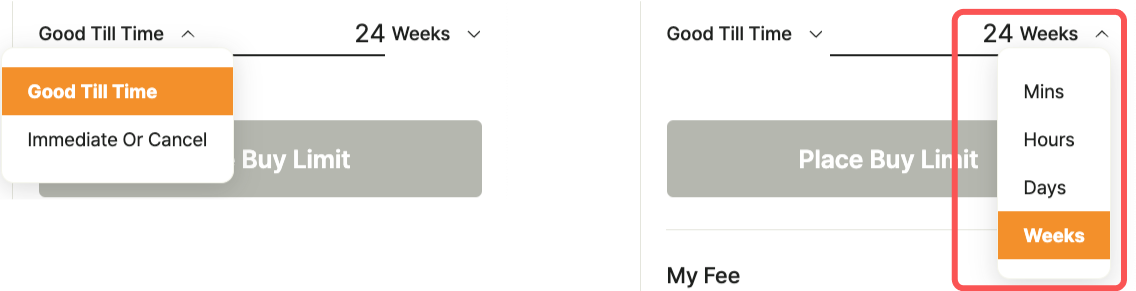
* Check [the order validity period option(TIF, Time In Force)](/decentralized-exchange/order-system/limit-market-order.md#order-option). By default, 24 weeks are set, and the user can modify it within the 24-week period.

<figure><img src="https://files.gitbook.com/v0/b/gitbook-x-prod.appspot.com/o/spaces%2FyLrMYXMQNX1FMIhwXQTK%2Fuploads%2FulcVn5pChozvNT30srIk%2Ftif%20limit%20buy.png?alt=media&#x26;token=31334d9c-fe73-472b-937e-05186449cb26" alt="" width="563"><figcaption></figcaption></figure>

* Select 'Place Buy limit (submit trade order to the order book).'

<figure><img src="/files/DrtQTFMXYx3dmpMDQbhf" alt="" width="246"><figcaption></figcaption></figure>

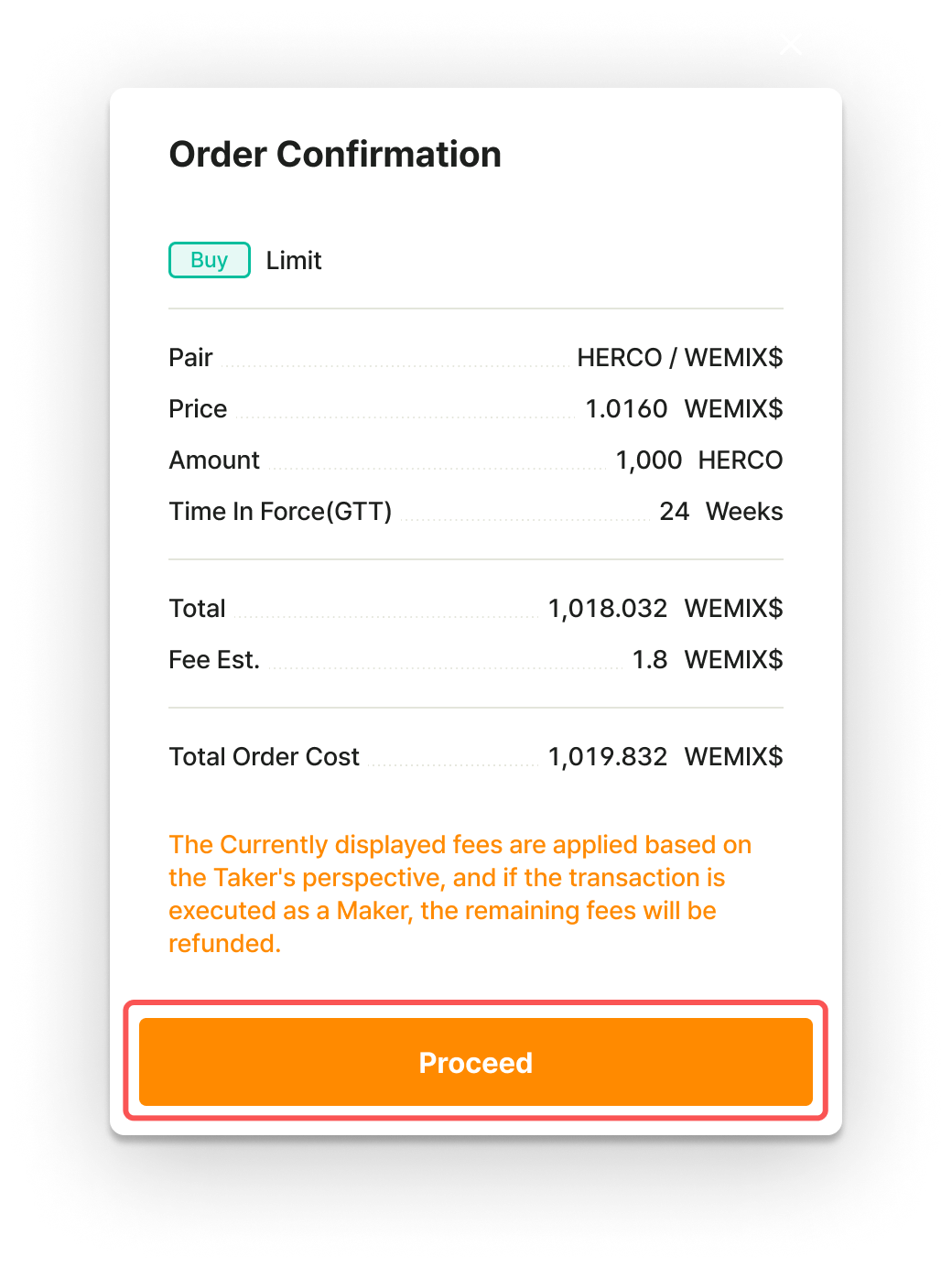
* Check the order information and select 'Proceed.'

<figure><img src="https://files.gitbook.com/v0/b/gitbook-x-prod.appspot.com/o/spaces%2FyLrMYXMQNX1FMIhwXQTK%2Fuploads%2Ff4awamyT035gIZX9nxHd%2Flimit%20buy%20proceed.png?alt=media&#x26;token=3ceddb7a-a3cb-4742-8f67-e81c79defb3b" alt="" width="375"><figcaption></figcaption></figure>

* Proceed with signing the wallet.

<figure><img src="/files/nf5vhjTt0jqIiEoZkdX0" alt="" width="375"><figcaption></figcaption></figure>

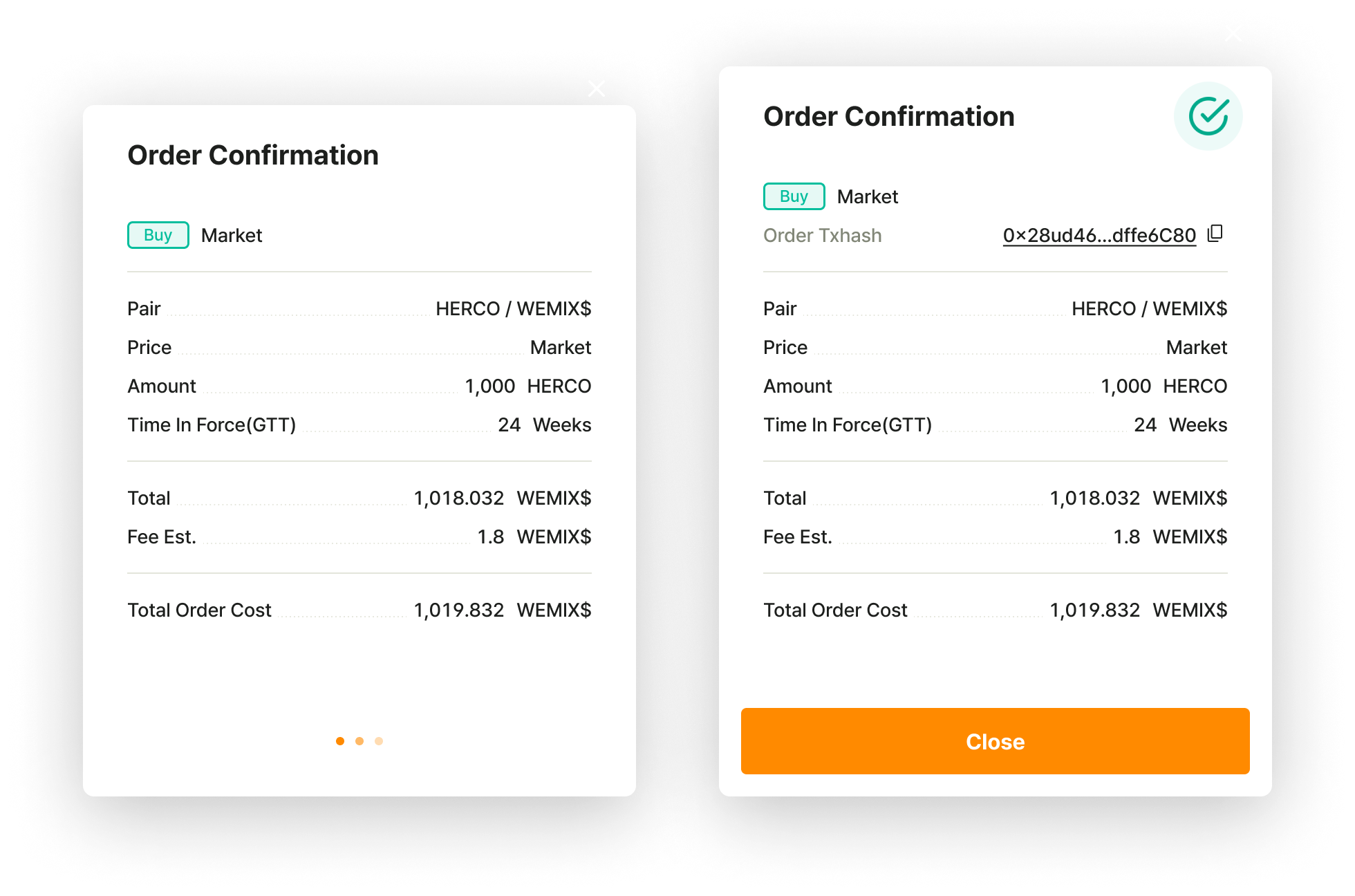
* When the signature is completed in the wallet, the order submission is complete.

<figure><img src="https://files.gitbook.com/v0/b/gitbook-x-prod.appspot.com/o/spaces%2FyLrMYXMQNX1FMIhwXQTK%2Fuploads%2FQAB3GdYktli9kSSo7Dzt%2Fmarket%20buy%20close.png?alt=media&#x26;token=ebc8b35e-fd16-4789-8076-c5d457bb4d90" alt=""><figcaption></figcaption></figure>
{% endtab %}

{% tab title="Market Buy" %}

> <mark style="color:blue;">**Market orders are matched strating from the best price level of market orders on the order book and, if necessary, extended to subsequent price levels to fulfill the desired order amounts. Therefore, it is essential to pay attention to the market price fluctuations.**</mark>

* Select 'Buy' at the top of the order window.

<figure><img src="/files/xA2RC5jDCagAZieGtSWa" alt="" width="244"><figcaption></figcaption></figure>

* Select 'Market' as the order price type.

<figure><img src="/files/JmiLgL00sEtmhO6SX0Ex" alt="" width="244"><figcaption></figcaption></figure>

* After checking available quantity to buy in the order book, choose 'Total.'

<figure><img src="/files/IULffRacNv2ZZTfWlHBV" alt="" width="563"><figcaption></figcaption></figure>

* For market buy orders, 'Total' is the default setting, allowing you to directly enter 'Total' to buy or adjust it using the gauge bar. 'Amount' (Excluding Expected Fee) is calculated and displayed automatically.

<figure><img src="/files/nA3YkApauY5ENunyXL9K" alt="" width="245"><figcaption></figcaption></figure>

* If you prefer to buy based on 'Amount,' select dropdown box and change it to 'Amount.'

<figure><img src="/files/Lyneg7tUBVMPf7uXi8v3" alt="" width="245"><figcaption></figcaption></figure>

* You can enter 'Amount'(the quantity) or adjust it using the gauge bar. 'Total'(=Amount \* Price + Expected Fee) is calculated and displayed automatically.

<figure><img src="/files/6dYHXydpvAKGJhHMC8Xf" alt="" width="245"><figcaption></figcaption></figure>

* Select 'Place Buy market (submit trade order).'

<figure><img src="/files/CXSEDjb87GTJmb0lBQgZ" alt="" width="245"><figcaption></figcaption></figure>

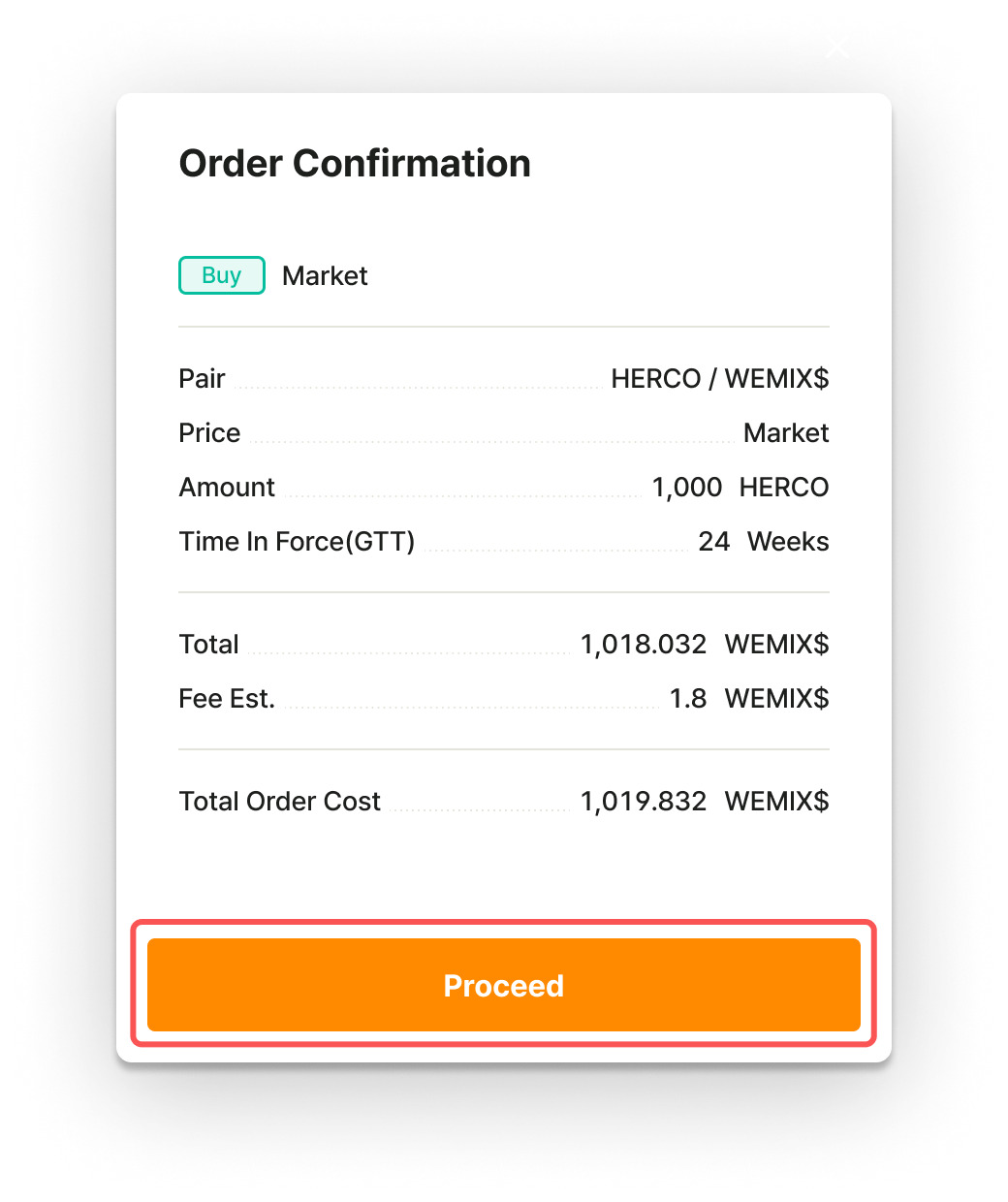
* Check the order information and select 'Proceed.'

<figure><img src="https://files.gitbook.com/v0/b/gitbook-x-prod.appspot.com/o/spaces%2FyLrMYXMQNX1FMIhwXQTK%2Fuploads%2FdWzxVceixuQASA0Olvtq%2Fmarket%20buy%20proceed.png?alt=media&#x26;token=66a695dd-5752-468c-979c-75d8409efe7f" alt="" width="375"><figcaption></figcaption></figure>

* Proceed with signing the wallet.

<figure><img src="/files/nf5vhjTt0jqIiEoZkdX0" alt="" width="375"><figcaption></figcaption></figure>

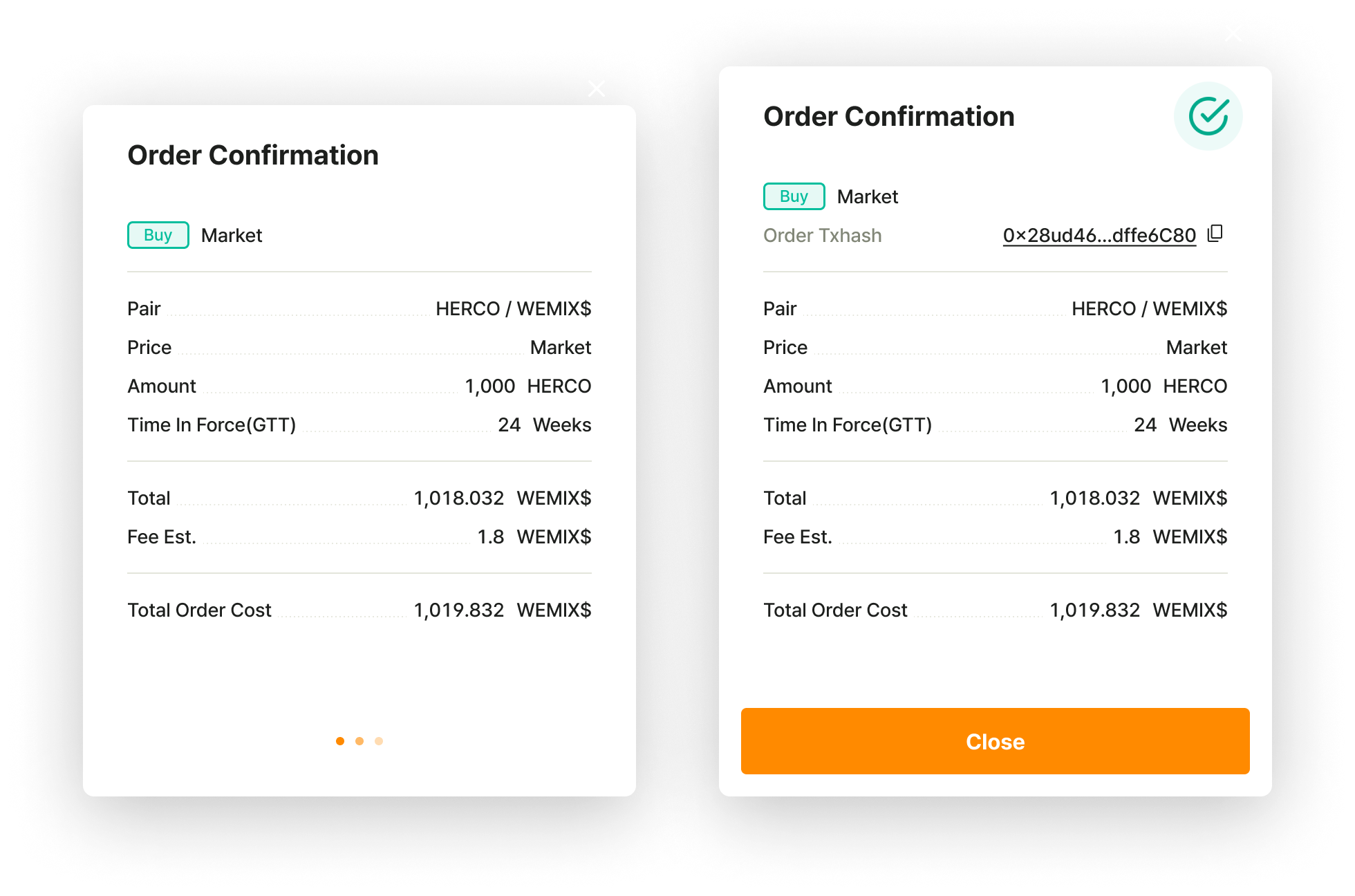
* When the signature is completed in the wallet, the order submission is complete.

<figure><img src="https://files.gitbook.com/v0/b/gitbook-x-prod.appspot.com/o/spaces%2FyLrMYXMQNX1FMIhwXQTK%2Fuploads%2FZopWOQlPGqn3mIvsQCJ0%2Fmarket%20buy%20close.png?alt=media&#x26;token=4879b691-b95b-445e-8bb9-52868d2ade61" alt=""><figcaption></figcaption></figure>
{% endtab %}
{% endtabs %}

## Sell

{% hint style="info" %}
Users can sell tokens to get WEMIX3.0 Tokens.&#x20;
{% endhint %}

{% tabs %}
{% tab title="Limit Sell" %}

> <mark style="color:blue;">**A limit sell is used when you want to sell tokens at a price higher than the current market price.**</mark>

* Select 'Sell' at the top of the order window.

<figure><img src="/files/c2h5WccSb1cmQnyhNwB8" alt="" width="245"><figcaption></figcaption></figure>

* Select 'Limit' as the order price type.

<figure><img src="/files/qIvVWcDPZA7mbw40Yjx5" alt="" width="245"><figcaption></figcaption></figure>

* After checking the price in the order book, enter '(limit) Price'.

<figure><img src="/files/AS11d2VbgVKstVTyOBc9" alt="" width="563"><figcaption></figcaption></figure>

* You can enter 'Amount'(the quantity) or adjust it using the gauge bar. 'Total'(=Amount \* Price + Expected Fee) is calculated and displayed automatically.

<figure><img src="/files/viDuW7Xklriszi1mSqNA" alt="" width="246"><figcaption></figcaption></figure>

* If you prefer to buy based on 'Total', select dropdown box and change it to 'Total.'

<figure><img src="/files/l764E0EBH6GrVS6n5OEq" alt="" width="246"><figcaption></figcaption></figure>

* After selecting 'Total,' you can directly enter 'Total' to sell or adjust it using the gauge bar. 'Amount' (Excluding Expected Fee) is calculated and displayed automatically.

<figure><img src="/files/z1PW0S8UfQaBsIYxwIl3" alt="" width="284"><figcaption></figcaption></figure>

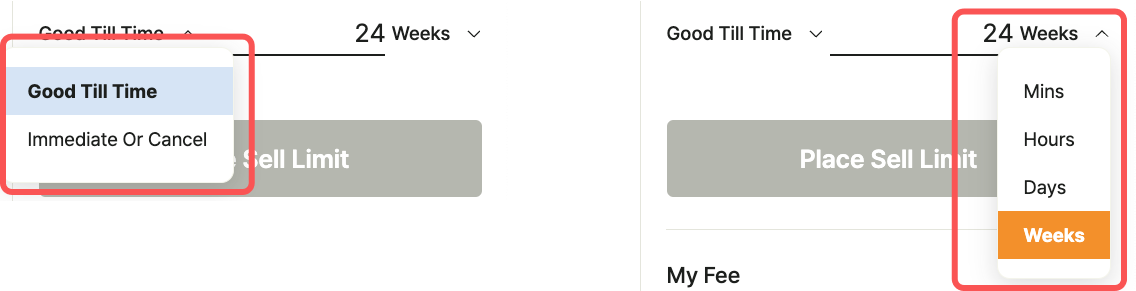
* Check [the order validity period option(TIF, Time In Force)](/decentralized-exchange/order-system/limit-market-order.md#order-option). By default, 24 weeks are set, and the user can modify it within the 24-week period.

<figure><img src="https://files.gitbook.com/v0/b/gitbook-x-prod.appspot.com/o/spaces%2FyLrMYXMQNX1FMIhwXQTK%2Fuploads%2FS16x2ghbXfegl7chzdCE%2Ftif%20limit%20sell.png?alt=media&#x26;token=b0e137d6-42f8-4ac2-82b0-82adc3f07faf" alt="" width="563"><figcaption></figcaption></figure>

* Select 'Place Sell limit (submit trade order to the order book).'

<figure><img src="/files/fWj4tMxa3kIC4PW6M8EG" alt="" width="245"><figcaption></figcaption></figure>

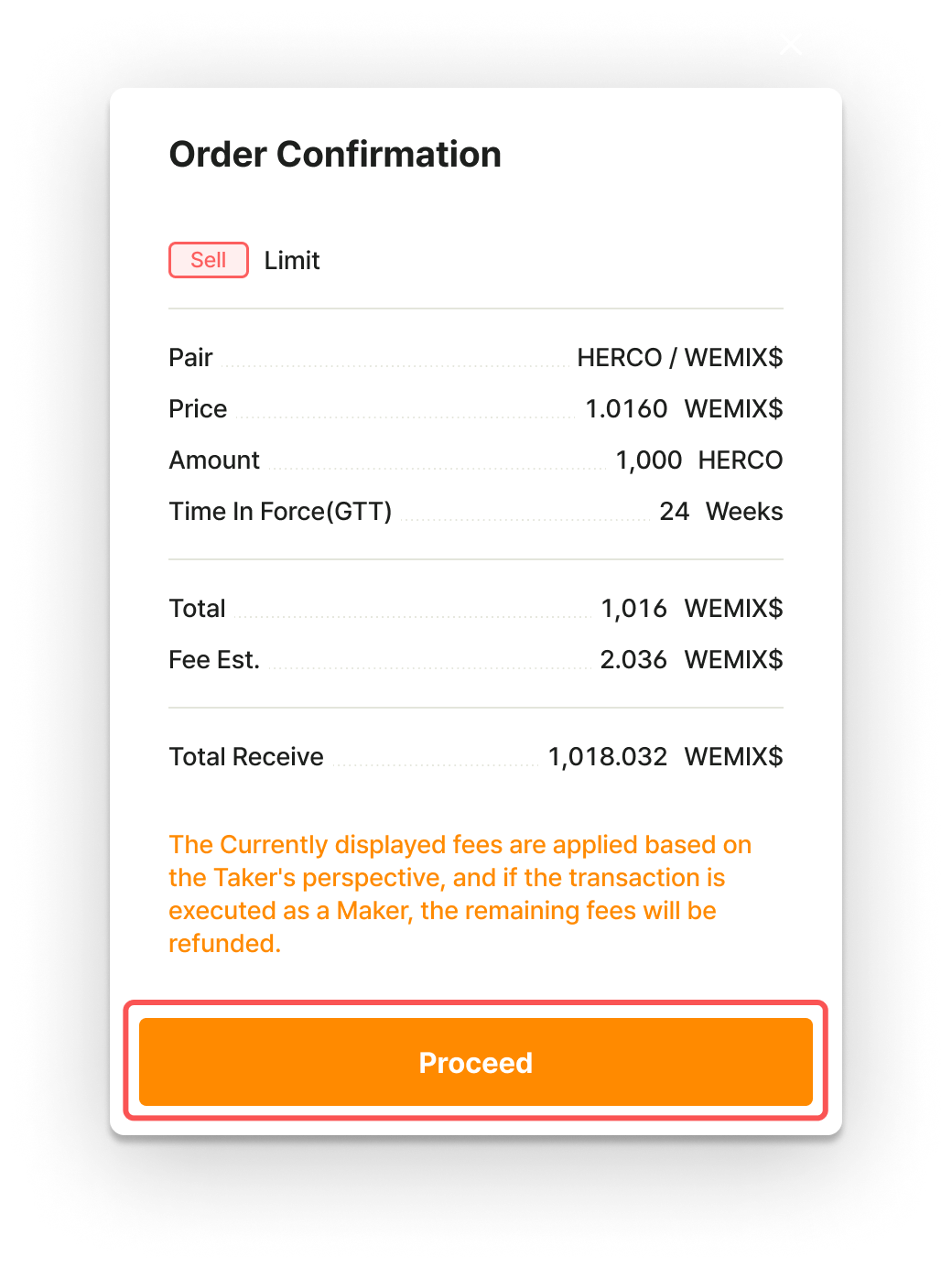
* Check the order information and select 'Proceed.'

<figure><img src="https://files.gitbook.com/v0/b/gitbook-x-prod.appspot.com/o/spaces%2FyLrMYXMQNX1FMIhwXQTK%2Fuploads%2FNGyQaslSgPXWuH5kAbCu%2Flimit%20sell%20proceed.png?alt=media&#x26;token=53b6bec8-1b81-43ee-a5eb-b58d15d69355" alt="" width="375"><figcaption></figcaption></figure>

* Proceed with signing the wallet.

<figure><img src="/files/nf5vhjTt0jqIiEoZkdX0" alt="" width="375"><figcaption></figcaption></figure>

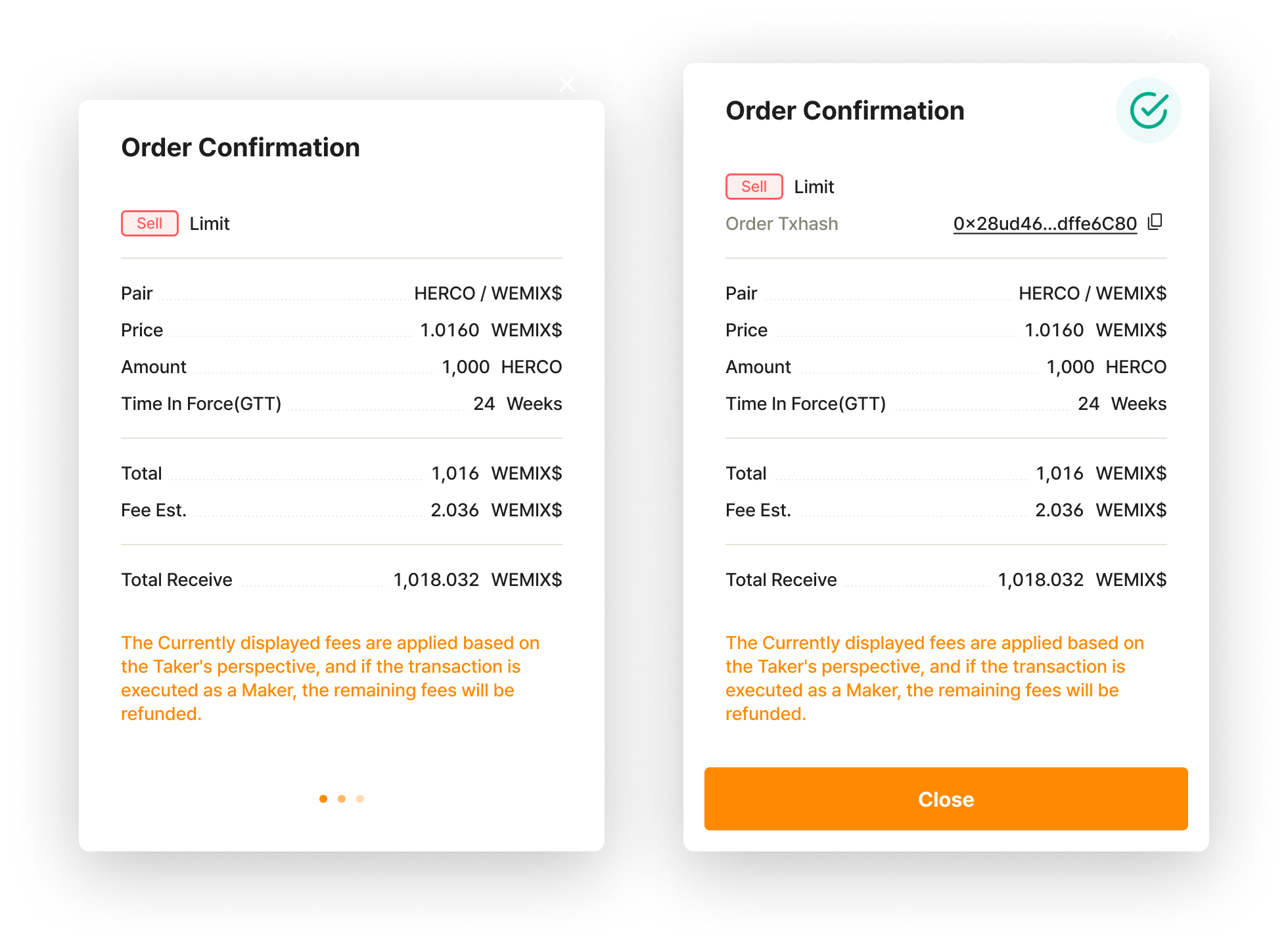
* When the signature is completed in the wallet, the order submission is complete.

<figure><img src="https://files.gitbook.com/v0/b/gitbook-x-prod.appspot.com/o/spaces%2FyLrMYXMQNX1FMIhwXQTK%2Fuploads%2FuBpSUkwo2OyUN2qq3sKi%2Flimit%20sell%20close.png?alt=media&#x26;token=a133de33-253b-46b6-858f-827c963742bb" alt=""><figcaption></figcaption></figure>
{% endtab %}

{% tab title="Market Sell" %}

> <mark style="color:blue;">**A market sell is used when you want to sell tokens immediately at the current market price. However, token prices may fluctuate while an order is being executed, so the execution price may differ from the market price at the time the order is placed.**</mark>

* Select 'Sell' at the top of the order window.

<figure><img src="/files/zK3WAozKqnWz7yuBiCBD" alt="" width="245"><figcaption></figcaption></figure>

* Select 'Market' as the order price type.

<figure><img src="/files/WlZarpmvTvvr4nl2N9Ua" alt="" width="245"><figcaption></figcaption></figure>

* After checking available quantity to sell in the order book, choose 'Amount.'

<figure><img src="/files/aa1FidmHrHcysSE7NHqq" alt="" width="375"><figcaption></figcaption></figure>

* For market sell orders, 'Amount' is the default setting, allowing you to directly enter 'Amount' to sell or adjust it using the gauge bar. 'Total'(=Amount \* Price + Expected Fee) is calculated and displayed automatically.

<figure><img src="/files/8SCrL0fWPX1lxEtxOXQr" alt="" width="284"><figcaption></figcaption></figure>

* If you prefer to buy based on 'Total,' select dropdown box and change it to 'Total.'

<figure><img src="/files/FPf33cUo03uNdf0MAUZQ" alt="" width="245"><figcaption></figcaption></figure>

* After selecting 'Total,' you can directly enter 'Total' to sell or adjust it using the gauge bar. 'Amount' (Excluding Expected Fee) is calculated and displayed automatically.

<figure><img src="/files/TPLgmKibFWeI0CD8occM" alt="" width="245"><figcaption></figcaption></figure>

* Select 'Place Sell market (submit trade order).'

<figure><img src="/files/EKRfIkd0ZbmbBHicvBO7" alt="" width="245"><figcaption></figcaption></figure>

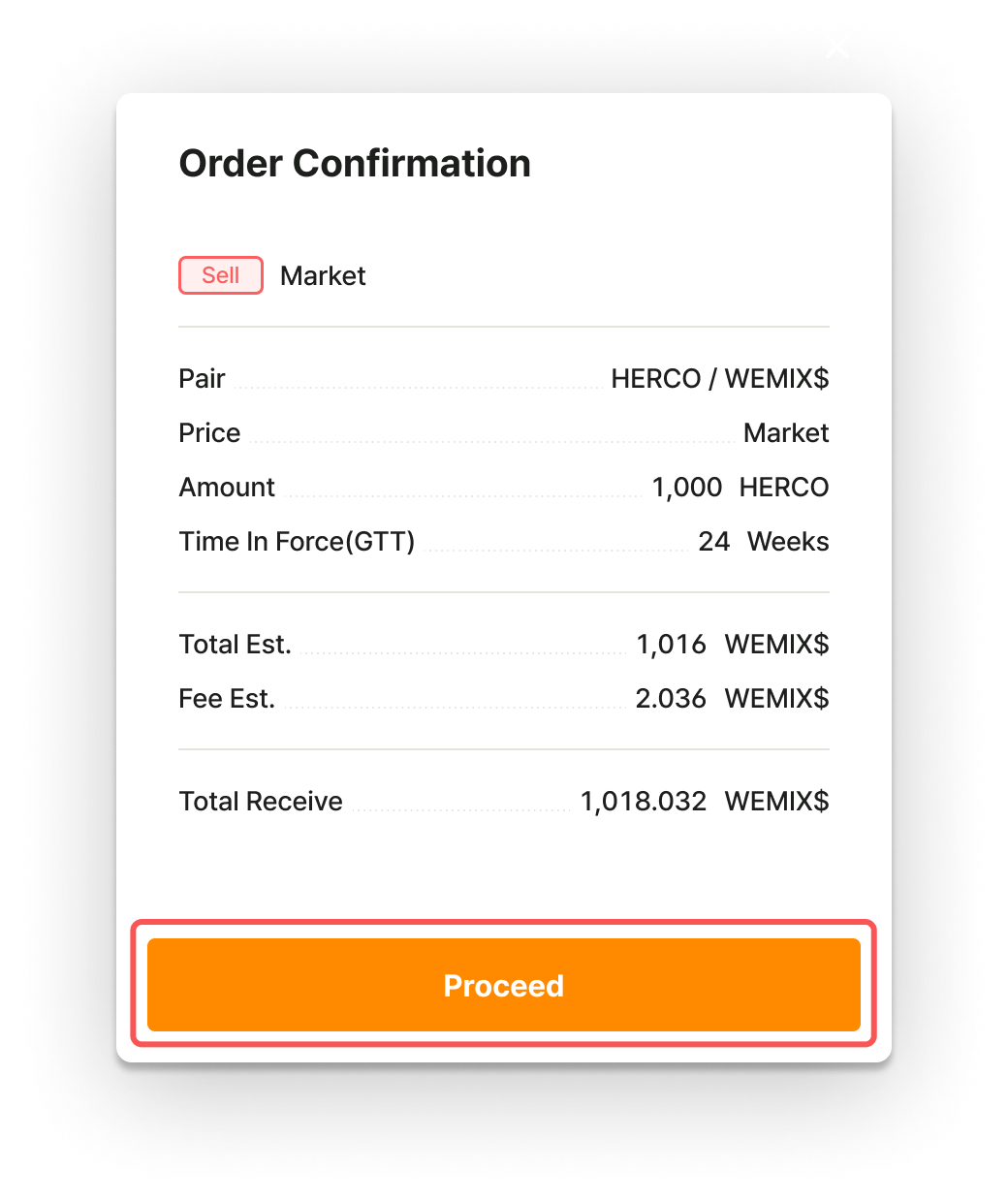
* Check the order information and select 'Proceed.'

<figure><img src="https://files.gitbook.com/v0/b/gitbook-x-prod.appspot.com/o/spaces%2FyLrMYXMQNX1FMIhwXQTK%2Fuploads%2FH5u7gsZewUQGWhFyJuMW%2Fmarket%20sell%20proceed.png?alt=media&#x26;token=6c254d8b-1420-4de8-bdad-958fa78ab733" alt="" width="375"><figcaption></figcaption></figure>

* Proceed with signing the wallet.

<figure><img src="/files/nf5vhjTt0jqIiEoZkdX0" alt="" width="375"><figcaption></figcaption></figure>

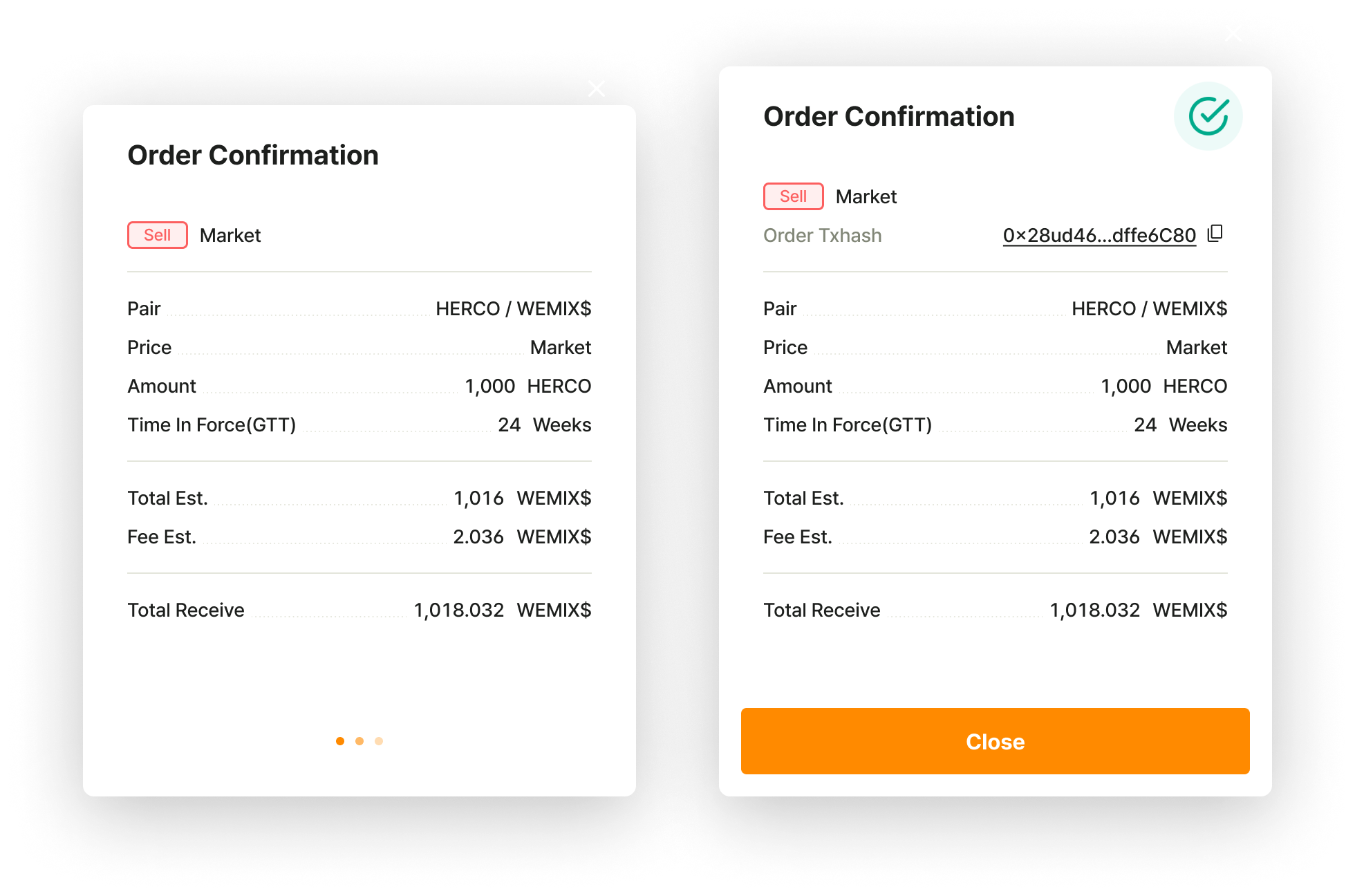
* When the signature is completed in the wallet, the order submission is complete.

<figure><img src="https://files.gitbook.com/v0/b/gitbook-x-prod.appspot.com/o/spaces%2FyLrMYXMQNX1FMIhwXQTK%2Fuploads%2F3nEYZQbO3lUG5btjqlBp%2Fmarket%20sell%20close.png?alt=media&#x26;token=c157aedf-d363-4d10-86d3-3de1bc0f270f" alt=""><figcaption></figcaption></figure>
{% endtab %}
{% endtabs %}


---

# Agent Instructions: Querying This Documentation

If you need additional information that is not directly available in this page, you can query the documentation dynamically by asking a question.

Perform an HTTP GET request on the current page URL with the `ask` query parameter:

```
GET https://docs-en.pnix.exchange/decentralized-exchange/step-by-step-user-guide/trade-order/basic-order.md?ask=<question>
```

The question should be specific, self-contained, and written in natural language.
The response will contain a direct answer to the question and relevant excerpts and sources from the documentation.

Use this mechanism when the answer is not explicitly present in the current page, you need clarification or additional context, or you want to retrieve related documentation sections.